

Butterflai is an Intelligence Layer: a system that sits on top of the tools your business already uses, understands the data inside them, and answers questions with evidence. This page explains how it actually works, layer by layer.
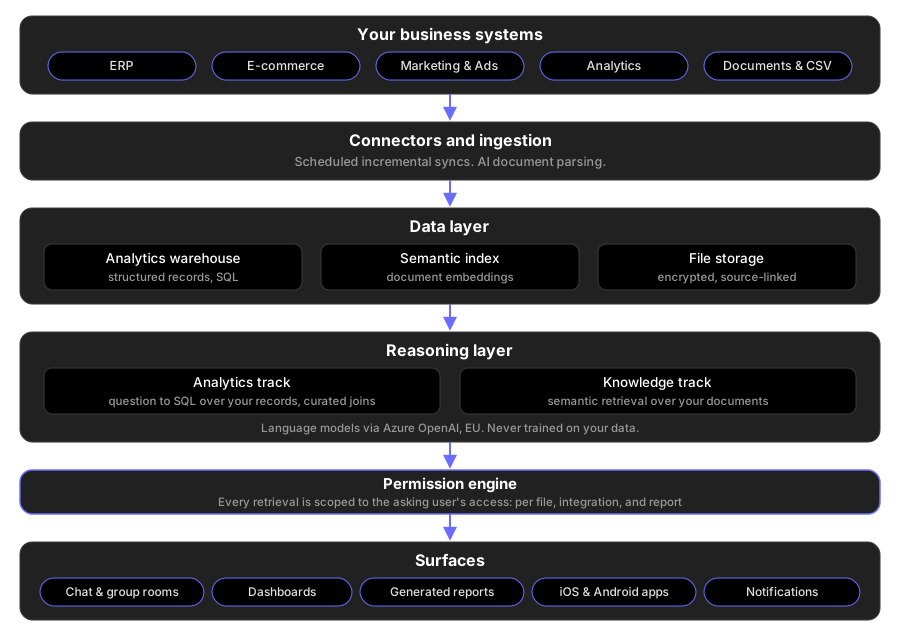
1. Connectors and ingestion
Data enters Butterflai two ways: through connectors to your business systems (ERP, e-commerce, marketing, analytics) and through direct uploads of documents and spreadsheets. Connector syncs are scheduled and incremental: after the initial backfill, Butterflai fetches only what changed, on a continuous schedule, so answers reflect your current data without manual refreshes. Uploaded documents (PDF, Word, Excel and more) are parsed with AI document intelligence so their contents become as queryable as a database.
2. The data layer
Structured and unstructured data are stored differently because they are queried differently:
- Analytics warehouse: synced integration data lands in per-account SQL tables, ready for precise, computed answers. Numbers come from queries over your actual records, not from a language model’s recollection.
- Semantic index: document content is embedded into a vector index so the platform can find the relevant passage in a contract, a report, or a policy, even when your question uses different words than the document.
- File storage: original files are kept in encrypted cloud object storage, so every answer can link back to its source.
3. The reasoning layer
When you ask a question, an agent pipeline plans how to answer it. Two tracks work together:
- The analytics track translates your question into SQL over the warehouse. It knows how the tables of each integration relate to each other through a curated relationship registry, so cross-table questions produce correct joins instead of guesses.
- The knowledge track retrieves the relevant passages from your documents through the semantic index, scoped to the files you can access.
The two tracks share one conversation, so “how did revenue develop last quarter, and what does our board deck say about it” is a single question, not two tools. Language models are provided through Azure OpenAI Service; your data is never used to train them.
4. The permission engine
Every retrieval, on both tracks, is filtered by what the asking user is allowed to see. Access is granted per file, per integration, and per report, directly or through roles, and the AI inherits exactly those boundaries. A colleague without access to payroll files cannot get payroll answers, no matter how the question is phrased. Read more under Security.
5. Delivery surfaces
- Chat: individual conversations and collaborative group rooms where teams and the AI work on the same question.
- Dashboards: KPI widgets and charts generated from your data, with rolling date windows and period comparisons that stay current.
- AI-generated KPIs: widget suggestions computed from synced data, each backed by a SQL query.
- Native mobile apps: iOS and Android apps with home-screen widgets, so key numbers are visible before you even open the app.
- Notifications: sync events and report completions delivered by push and in-app, with daily digests.
From question to answer
Putting it together, a question moves through: understand (what is being asked), plan (which track, which sources), retrieve and compute (SQL over the warehouse, semantic retrieval over documents, always permission-scoped), ground (assemble the evidence), and answer (a response with its sources attached).

How we make that reasoning inspectable is described on the Explainable AI page.
Want to see it on your own data? Get a demo.